

Download Orbit Menu – Windows, desktop, dock, menu, productivity, utility, tool, application, modern, customizable, space-saving, visual, interface, customizable dock, modern desktop experience, keyboard shortcuts, mouse gestures
Overview
Orbit Menu is a productivity-focused utility designed for Windows users seeking a modern and efficient alternative to traditional desktop menus. The application introduces a circular dock that blends seamlessly into the desktop environment, offering a space-saving solution for launching frequently used programs. By remaining hidden until activated, Orbit Menu preserves full-screen clarity, making it ideal for users who prioritize uninterrupted visual experiences during work or entertainment. Its primary purpose is to streamline application access while minimizing visual clutter, addressing common pain points associated with crowded taskbars and permanent docks.
The app targets users who value both aesthetics and functionality—particularly professionals, creatives, and power users who manage multiple applications simultaneously. The developer, Orbit Software, has positioned Orbit Menu as a lightweight, customizable tool aimed at enhancing daily workflow efficiency. While specific details about the company’s background are not available, the application’s longevity since its release in 2008 suggests a stable and dedicated development history. Real-world use cases include quick access to design tools, media players, or communication apps without disrupting the current screen context.
Orbit Menu contributes to the broader Windows productivity ecosystem by offering a unique interface paradigm. It represents a niche but valuable innovation in desktop utilities, catering to users who desire a more refined and modern computing experience. Despite its age, the app continues to serve as a relevant tool for those looking to upgrade their desktop interface with minimal resource usage.
Key Features & Functionality
- Customizable Dock: Users can add, remove, and organize applications into categories, tailoring the dock to match individual workflows. This feature supports dynamic reconfiguration based on daily tasks.
- Space-Saving Design: The dock remains hidden until summoned, ensuring that full-screen applications are not obstructed by interface elements. This is particularly beneficial during presentations, gaming, or video editing sessions.
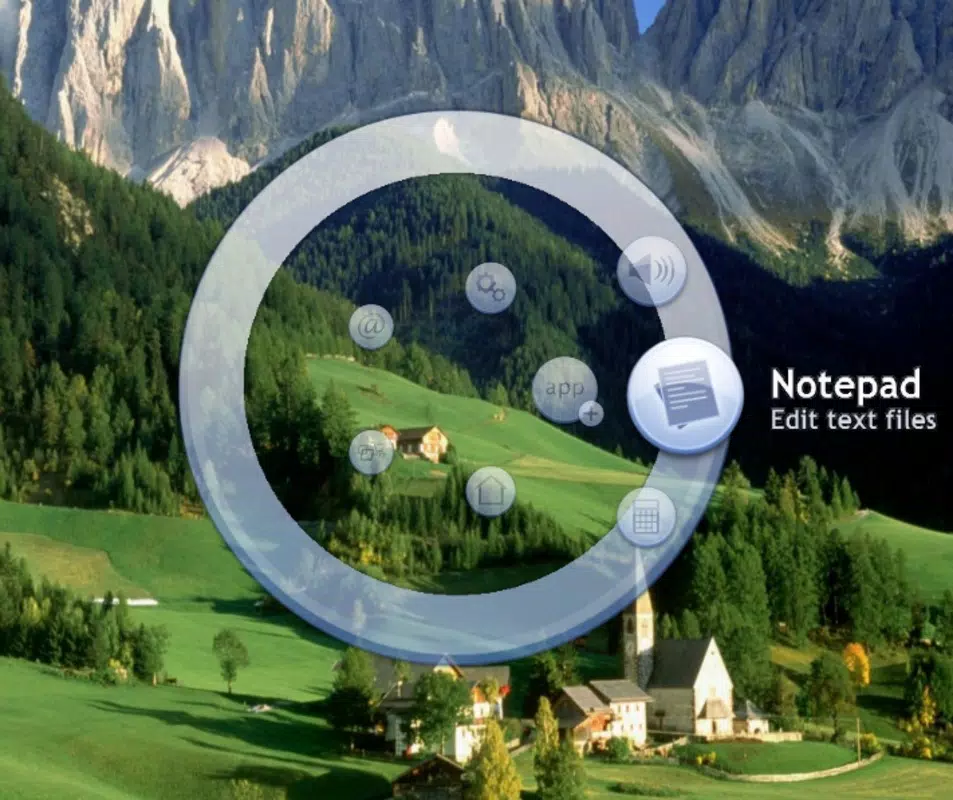
- Visual Appeal: The circular layout with crystal-like reflections provides a sleek, modern aesthetic that enhances the desktop’s visual harmony. The design emphasizes minimalism while maintaining usability.
- Flexible Access Methods: Activation can be triggered via keyboard shortcuts or mouse gestures, allowing users to choose the method that best fits their interaction preferences. This adaptability supports faster access without disrupting workflow.
- User-Friendly Interface: The intuitive layout ensures that even non-technical users can navigate and configure the dock with ease. Setup requires minimal learning, making it accessible across skill levels.
For example, a graphic designer might use Orbit Menu to quickly launch Adobe Photoshop, Illustrator, and a media player with a single gesture. Similarly, a student working on a research project could organize reference tools and note-taking apps into custom categories for rapid access. The ability to personalize the interface ensures that the app scales with user needs over time.
Interface, UX & Performance
Orbit Menu features a circular UI layout with a minimalist design language, emphasizing clarity and visual elegance. The interface is centered on a round dock that appears with smooth animations when activated. The visual style incorporates subtle reflections and a clean color scheme, contributing to a polished and modern appearance. Navigation is straightforward: users can hover or click to access applications, and the layout adjusts dynamically based on the number of entries.
Interaction is designed to be intuitive, with consistent feedback during activation and selection. The application responds promptly to user inputs, supporting both keyboard shortcuts and mouse gestures without noticeable lag. Although the developer did not list formal performance metrics, the app’s small file size of 3.2 MB suggests efficient resource usage, likely minimizing impact on system performance.
Responsiveness across device categories appears consistent, though specific compatibility details were not disclosed. Stability is implied by the app’s long-standing presence on the Windows platform. Users can expect reliable operation during extended use, with no reported issues related to crashes or memory leaks. Overall, the UX prioritizes speed, simplicity, and aesthetic refinement.
Platform Compatibility & Technical Requirements
Orbit Menu is designed for the Windows operating system. The current version is 1.0.1, with a file size of 3.2 MB. The app is compatible with Windows platforms, though specific OS versions or hardware requirements were not listed by the developer. This lack of detailed information means users should verify compatibility with their system before installation.
Given its lightweight nature, Orbit Menu is likely to function on a wide range of Windows devices, including older systems. However, the absence of formal requirements prevents definitive claims about minimum specifications. Users are advised to consult official sources or test the application in a safe environment if unsure about system compatibility.
Pros and Cons
Pros
- Compact and lightweight at only 3.2 MB.
- Space-saving design that remains hidden until activated.
- Highly customizable dock with user-defined categories.
- Supports both keyboard shortcuts and mouse gestures for access.
- Modern, visually appealing interface with smooth animations.
- Stable performance with minimal system resource usage.
Cons
- Specific OS requirements were not disclosed by the developer.
- Version history and update frequency are not publicly available.
- Limited information on technical support or documentation.
- May not support newer Windows features or high-DPI displays without additional configuration.
- Price point of $14.95 may be considered high for a utility with limited feature set.
FAQ
Is Orbit Menu compatible with all Windows versions?
The developer did not specify minimum OS requirements. Users should verify compatibility with their system before installation.
Can I customize the applications in the dock?
Yes, Orbit Menu allows users to add, remove, and organize programs into custom categories for personalized access.
How do I activate the Orbit Menu?
Activation can be triggered using keyboard shortcuts or mouse gestures, offering flexible access based on user preference.
Is the app safe to download and install?
Orbit Menu is developed by Orbit Software and distributed through official channels. As with any third-party tool, users should ensure they download from trusted sources to maintain security.
Does Orbit Menu receive regular updates?
Update frequency and version history were not publicly disclosed. Users are encouraged to check the developer’s website for the latest information.
Final Thoughts
Orbit Menu stands out as a refined and efficient utility for Windows users seeking a modern desktop experience. Its space-saving design, customizable interface, and flexible access methods make it a practical tool for enhancing productivity. While its age and limited public documentation may raise questions about long-term support, its core functionality remains relevant and effective.
Users who value aesthetics, minimalism, and streamlined access to their applications will find the most value in this tool. Whether used for creative work, multitasking, or simply improving desktop organization, Orbit Menu delivers a clean and intuitive solution.
Download Orbit Menu now


